Netopia 6.3 Instrukcja Użytkownika Strona 79
- Strona / 161
- Spis treści
- BOOKMARKI

- Software User Guide 1
- Disclaimers 2
- Section 4 4
- Appendix A 5
- http://www.cayman.com/ 7
- Documentation Conventions 8
- Organization 10
- Basic Product Structure 11
- About Cayman-series Gateways 11
- Section 2 11
- What’s New in Version 6.3 12
- Capabilities Roadmap: 13
- Cayman Gateways with COS 6.3 13
- Section 3 14
- Management 15
- Local Area Network 16
- Wide Area Network 17
- Static IP Addresses 18
- Security 19
- Internal Servers 20
- Dual Ethernet Gateway 20
- Pinholes 21
- Default Server 21
- Security Monitor 22
- Event Details 23
- BreakWater Basic Firewall 26
- VPN IPSec Pass Through 27
- SafeHarbour VPN IPSec Tunnel 28
- Access the User Interface 29
- Home page 30
- Home page - Information 31
- Navigating the Web Interface 32
- Response 33
- Alert Symbol 34
- Security -> Passwords 35
- Configure 36
- Configure -> Quickstart 37
- Change Procedure 38
- Section 4 Configure 39
- Save and Restart 40
- Configure -> LAN 43
- Configure -> WAN 44
- Advanced 45
- IP Static ARP 46
- Configure Specific Pinholes 47
- Internet 48
- Configure the IPMaps Feature 52
- Gateway? 53
- IPMaps Block Diagram 54
- Cayman Gateway 54
- Protocol Lifetimes 55
- Configure a Default Server 56
- Description 58
- DHCP Server 59
- Ethernet Bridge 61
- Override 64
- Traffic Shaping 64
- Ethernet MAC Address 64
- Clear Options 65
- Create and Change Passwords 67
- • It is case-sensitive 68
- Use a Cayman Firewall 69
- Firewall 69
- Gateway: WAN Side 71
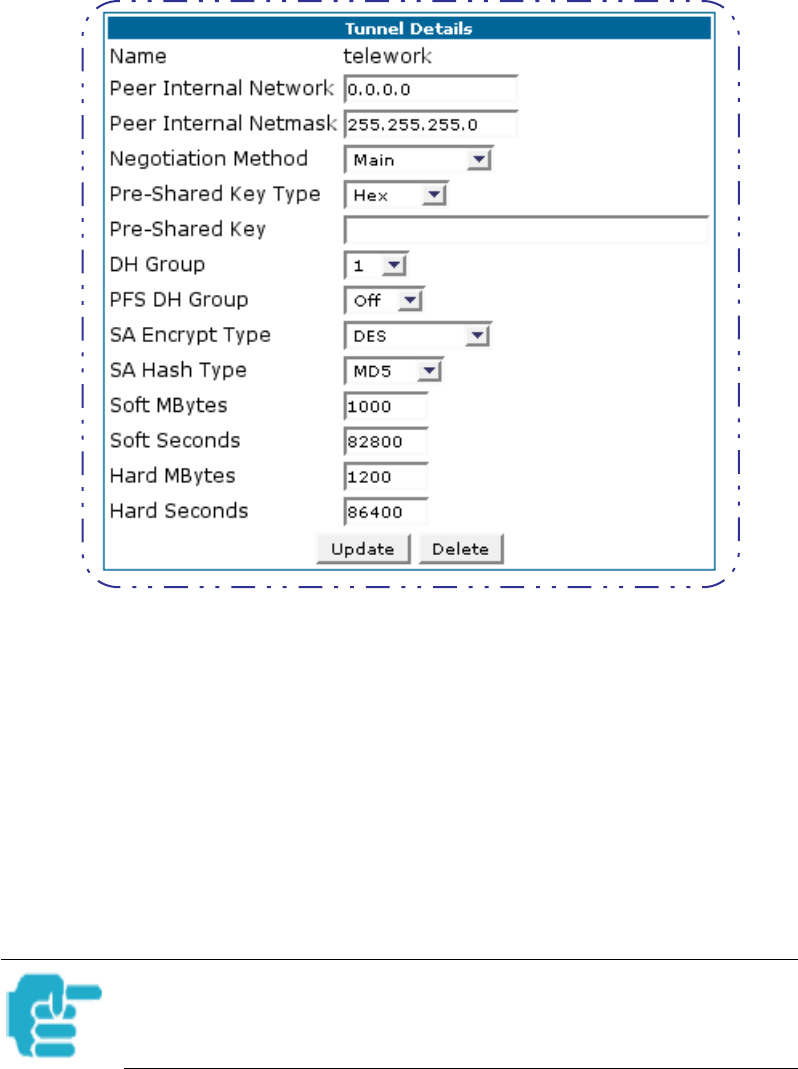
- Configure a SafeHarbour VPN 73
- Task 3: Enable IPSec 77
- Use the following steps: 79
- Security Log 80
- Timestamp Background 82
- • Install new Feature Keys 83
- Install Software 84
- Warnings: 85
- Software Upgrade Instructions 86
- Task 1 Required Files 86
- Task 2 Updater File 87
- Task 3 COS 6.3 Image File 89
- Install Keys 93
- Network Tools 99
- TraceRoute 99
- Troubleshoot 100
- System Status 101
- Disconnect Current WAN Users 102
- Exceeding the WAN User Limit 103
- Overview 104
- CONFIG Commands 105
- Logging In 106
- Connecting from telnet 106
- Using the CLI Help Facility 107
- About SHELL Commands 107
- SHELL Commands 108
- server_address 109
- , or lastconnect argu 115
- About CONFIG Commands 117
- ETURN. For example, you move 117
- Guidelines: CONFIG Commands 118
- . For example: 119
- Validating Your Configuration 120
- Bridging Settings 122
- DHCP Settings 123
- DMT Settings 124
- Domain Name System Settings 124
- Ethernet MAC Address Settings 124
- IP Settings 125
- Ethernet Settings 126
- Default IP Gateway Settings 128
- WAN-to-WAN Routing Settings 129
- IP-over-PPP Settings 129
- MAC_address 131
- Static Route Settings 132
- WAN Settings 133
- IPMaps Settings 134
- PPPoE Settings 136
- Configuring Basic PPP Settings 137
- Port Renumbering Settings 141
- Security Settings 142
- SNMP Settings 145
- System Settings 145
- Traffic Shaping Settings 147
- Glossary 148
- Appendix B 148
- Internet Key Exchange (IKE) 152
- inspect between 1 and 3 lay 153
- 1 and 1,000,000 MB 155
- Contact Information 161
Powiązane produkty i podręczniki dla Routery Netopia 6.3
 (11 strony)
(302 strony)
(301 strony)
(11 strony)
(302 strony)
(301 strony)
© 2020, manymanuals.pl. Wszelkie prawa zastrzeżone. | 0.047 s |
 Manymanuals.com
 Manymanuals.de
 Manymanuals.fr
 Manymanuals.it
 Manymanuals.pl
 Manymanuals.cz
 Manymanuals.es
 Manymanuals-pt.com
Komentarze do niniejszej Instrukcji